
TL;DR
The Wibu-Systems CodeMeter service (CodeMeter.exe) runs as
NT AUTHORITY\SYSTEM and can be instructed from a low-privileged session
via cmu.exe to create and delete files under C:\CM-Stick. Through a
directory symlink hijack this turns into an arbitrary file delete which,
with a little ::$INDEX_ALLOCATION NTFS trickery and the C:\Config.Msi
Windows Installer rollback technique, upgrades into a full local privilege
escalation to SYSTEM and is tracked as CVE-2026-81572
Follow along for the full disclosure.
Wibu-Systems CodeMeter
Greetings dear Computer Dweller. Let us just dig right in..
CodeMeter is a universal software protection and licensing system created by Wibu-Systems. It prevents software piracy, reverse engineering and tampering by encrypting application code and managing digital licenses.
It is written in C which makes it a bit hard to reverse engineer and knowing the purpose of the application, we can guess that there will be obfuscation and anti-debugging involved. Maybe we should just stick to Windows shenanigans for this post...
What makes CodeMeter interesting is that you can locally, from a low-privileged user's
perspective, interact with a running Windows service: CodeMeter.exe, which runs
as NT AUTHORITY\SYSTEM. A perfect scenario for researching privilege escalation.
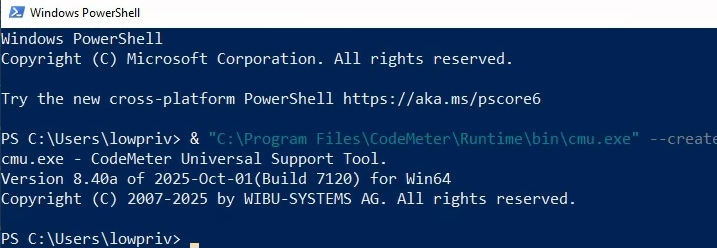
cmu.exe
cmu.exe is the binary that interacts with the service and can be found in
C:\Program Files\CodeMeter\Runtime\cmu.exe. It's -h output lists multiple
interesting actions.
When dealing with actions initiated from a low-privileged perspective through a high-privileged process, one thing to look for is filesystem write operations. If a low-privileged user is allowed to modify files through the privileged process, then escalation of access may occur through various techniques.
When parsing the -h output, --create-io looks like a fun candidate:

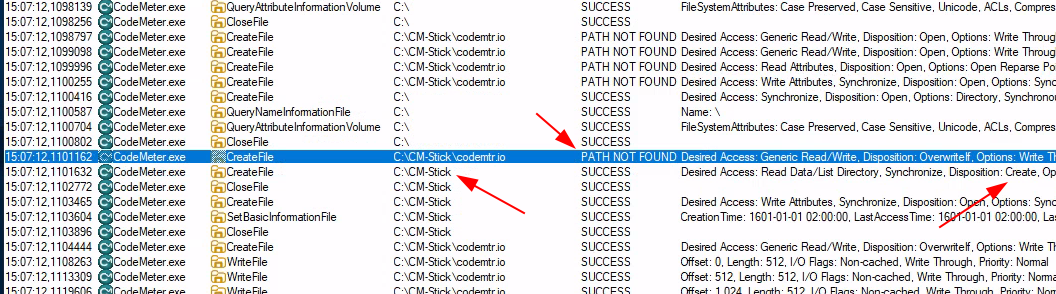
We spin up procmon64.exe from SysInternals to review all disk operations
that CodeMeter.exe performs while we send cmu.exe --create-io --file C:.
What we can see in the following screenshot is that CodeMeter.exe attempts
to write to C:\CM-Stick\codemtr.io and if the folder C:\CM-Stick does not
exist it will be created:
C:\ is an interesting path as low-privileged users are not allowed to create
files in this directory - but they are allowed to create folders. Perfect opportunity
for a directory symlink hijack.
In theory, if we were to create a symlink from C:\CM-Stick\codemtr.io to
C:\Users\Administrator\AppData\Roaming\Microsoft\Windows\Start Menu\Programs\Startup\run.bat
and we were able to control its content - we could get code execution when the
administrator signs in.
Little time was spent looking at this scenario as another fan-favorite file action gadget was found.
When scrolling through the procmon64.exe output we notice a file delete
action on C:\CM-Stick\codemtr.nio.

Jeeboii. This may be our way to escalate privileges and a type of privilege escalation that your humble narrator has been aiming to test. Let me explain...
Arbitrary file delete
First we must turn this into an arbitrary file delete. We turn to James Forshaw's trusted Symbolic Link Testing tools (available on github).
For those who do not know, this repository contains code and binaries used
to create various types of symbolic links in Windows. One of the most useful
symbolic link techniques during privilege escalation is packaged in CreateSymlink.exe.
This is used to create a \RPC Control\
instance in the Windows object namespace, and plant a
symlink there that can redirect file or registry operations to arbitrary paths or files.
Few things to note:
- It does not require admin-level permissions
- The folder where the symlink is placed must be empty, or non-existent
So with the following command we should be able to delete arbitrary files:

Next up... How do we turn this into an LPE?
Arbitrary file delete -> LPE
Back in March 2021 is probably the first record of this type of arbitrary file delete -> local privilege escalation. Researcher Abdelhamid Naceri abused the fact that the Windows Installer service uses a roll-back feature if an installation is cancelled or fails.
The MSI installer
creates a folder C:\Config.Msi that is only writable by NT AUTHORITY\SYSTEM. However,
if this folder is deleted, an attacker can place their own rollback script
and restore files to arbitrary locations as NT AUTHORITY\SYSTEM.
The first revision of this LPE technique exploits a race condition and creates
a weakly permissioned C:\Config.Msi folder right after tricking a SYSTEM process.
This is however a time-sensitive trick that isn't always reliable.
A new revision was released in March 2022 (https://github.com/thezdi/PoC/tree/main/FilesystemEoPs) where the attack is split into two stages, making it a lot more reliable with the arbitrary-folder-delete trigger happening between them:
Stage 1:
Stage 1 does not perform the privilege escalation yet. Its job is to prepare the Windows Installer rollback folder.
The PoC installs and then uninstalls its MSI package. During the uninstall,
Windows Installer moves a file into C:\Config.Msi and turns it into an .rbf rollback file.
The PoC deliberately keeps that rollback file open so Windows Installer cannot delete it normally. After the uninstall finishes, the PoC deletes the remaining .rbf file itself.
This leaves behind an important situation: C:\Config.Msi still exists and
Windows Installer still knows about it, but the folder itself is now empty.
At this point, Stage 1 stops.
The attacker should now delete C:\Config.Msi which activates Stage 2.
Stage 2:
After C:\Config.Msi has been deleted, the PoC recreates it with permissions
the attacker can control.
It then starts another MSI installation that is made to fail, forcing Windows
Installer to roll back. During that rollback, Windows creates rollback
files inside C:\Config.Msi.
The PoC replaces those legitimate rollback files with malicious ones before Windows Installer continues.
Because Windows Installer performs the rollback with SYSTEM privileges, it follows the attacker-controlled rollback instructions and places a malicious DLL in a protected system location.
This attack comes with nuances however. It requires low-privileged users to run per-user based MSI installations, enabled by default on Windows 10/11 but disabled on Windows Server.
To enable per-user MSI installations on Windows Server, run:
reg add "HKLM\Software\Policies\Microsoft\Windows\Installer" /v DisableMSI /t REG_DWORD /d 0 /f
The Windows Server Group Policy settings should not determine whether an application is vulnerable to LPE/arbitrary file delete. Hence, this should not be taken into account when assessing the severity.
However, the code in the repository did not work on a fresh system, so a couple of fixes were needed, which can be reviewed in this pull request.
Arbitrary file delete -> arbitrary folder delete?
So backing up a few steps... C:\Config.Msi is a folder. So if an application
uses Windows API function DeleteFileW
to delete files, we cannot simply
make it delete folders with CreateSymlink.exe. Or could we?
This is where a neat NTFS trick comes into play and the background is explained best by Microsoft themselves:
All files on an NTFS volume consist of at least one stream - the main stream – this is the normal, viewable file in which data is stored. The full name of a stream is of the form below.
<filename>:<stream name>:<stream type>The default data stream has no name. That is, the fully qualified name for the default stream for a file called "sample.txt" is "sample.txt::$DATA" since "sample.txt" is the name of the file and "$DATA" is the stream type.
To demonstrate NTFS stream functionality we can do the following.
We start by creating a regular file with the content "snus1":
C:\test>echo snus1 > test.txt

C:\test>type test.txt
snus1
We then write "snus2" to the default stream (i.e., no stream name between the ::),
and show the content. Note that the type and more commands by default cannot show alternate stream data;
instead more together with input redirection must be used:
C:\test>echo snus2 > test.txt::$DATA

C:\test>type test.txt
snus2

C:\test>more < test.txt::$DATA
snus2
Now, we write "snus3" to an alternate stream, and verify this with dir /r:
C:\test>dir /r
 Volume in drive C has no label.
 Volume Serial Number is BCAC-A6BC

 Directory of C:\test

2026-08-18  09:00    <DIR>          .
2026-08-18  09:00    <DIR>          ..
2026-08-18  09:00                 8 test.txt
               1 File(s)              8 bytes
               2 Dir(s)  49 893 085 184 bytes free

C:\test>echo snus3 > test.txt:snus:$DATA

C:\test>dir /r
 Volume in drive C has no label.
 Volume Serial Number is BCAC-A6BC

 Directory of C:\test

2026-08-18  09:00    <DIR>          .
2026-08-18  09:00    <DIR>          ..
2026-08-18  09:01                 8 test.txt
                                  8 test.txt:snus:$DATA
               1 File(s)              8 bytes
               2 Dir(s)  49 893 085 184 bytes free

C:\test>more < test.txt:snus:$DATA
snus3
Cool! But let's stop side-tracking. Back to topic.
One of the NTFS attribute types that exist is :
| NTFS attribute | Description |
|---|---|
| $INDEX_ALLOCATION | The type name for a Directory Stream. A string for the attribute code for index allocation |
Let's test this:
C:\test>echo snus3 > test::$INDEX_ALLOCATION
The system cannot find the file specified.

C:\test>dir /r
 Volume in drive C has no label.
 Volume Serial Number is BCAC-A6BC

 Directory of C:\test

2026-08-18  09:52    <DIR>          .
2026-08-18  09:52    <DIR>          ..
2026-08-18  09:52    <DIR>          test <--- Note that this has now become a directory
               0 File(s)              0 bytes
               3 Dir(s)  49 886 056 448 bytes free
Cool?
Now we create a PowerShell function that imports the Win32 DeleteFile function and delete
the ::$INDEX_ALLOCATION of our test folder:
function Win32-DeleteFile {
    param(
        [Parameter(Mandatory)]
        [string]$Path
    )

    if (-not ("NativeMethods" -as [type])) {
        Add-Type @"
using System;
using System.Runtime.InteropServices;

public static class NativeMethods {
    [DllImport("kernel32.dll",
        CharSet = CharSet.Unicode,
        SetLastError = true)]
    public static extern bool DeleteFile(string lpFileName);
}
"@
    }
    $streamPath = "$Path"
    if (![NativeMethods]::DeleteFile($streamPath)) {
        $code = [Runtime.InteropServices.Marshal]::GetLastWin32Error()
        $message = [ComponentModel.Win32Exception]::new($code).Message
        throw "DeleteFileW failed ($code): $message"
    }
}
Win32-DeleteFile -Path 'C:\test\test::$INDEX_ALLOCATION'
The folder is removed!
So by removing a folder's
::$INDEX_ALLOCATION NTFS attribute it will no longer be a directory, effectively
deleting the whole directory.
So with CreateSymlink.exe, we should specify:

Update 2026-09-07 regarding INDEX_ALLOCATION
As pointed out by fellow Offensive Security Expert Alexander Blomqvist, Microsoft has fixed
the ::$INDEX_ALLOCATION folder delete trick in later versions of Windows.
The following has been tested and confirmed on fully updated Operating Systems of Windows:
| OS | OS Build | INDEX_ALLOCATION trick successful |
|---|---|---|
| Windows 10 | 19045.6456 | True |
| Windows 11 (25H2) | 26200.9168 | False |
| Windows Server 2019 | 17763.9121 | True |
| Windows Server 2022 | 20348.5499 | True |
| Windows Server 2025 (24H2) | 26100.32230 | False |
The following is the output of an unsuccessful folder delete:
PS C:\Users\administrator.TEST> Win32-DeleteFile -Path 'C:\test\test::$INDEX_ALLOCATION'
DeleteFileW failed (5): Access is denied
At line:24 char:9
+         throw "DeleteFileW failed ($code): $message"
+         ~~~~~~~~~~~~~~~~~~~~~~~~~~~~~~~~~~~~~~~~~~~~
    + CategoryInfo          : OperationStopped: (DeleteFileW failed (5): Access is denied:String) [], RuntimeException
    + FullyQualifiedErrorId : DeleteFileW failed (5): Access is denied
PoC
Putting it all together the PoC would look like this:
To explain what happens in the video:
- Print our low-privileged session
- Create a symbolic link from
C:\CM-Stick\codemtr.nioto'C:\\Config.Msi::$INDEX_ALLOCATION' - Create a symbolic link for
C:\CM-Stick\codemtr.io. This file must exist otherwise thecmu.execommand will fail. - Run
FolderOrFileDeleteToSystem.exeto setup stage 1 of the MSI install trick. - Execute
cmu.exeto delete theC:\Config.Msifolder - MSI Installer successfully rolls back a malicious DLL.
- This DLL will be loaded, and execute
cmd.exewhen OSD.exe is running at the logon screen. This is performed by having OSD running and hitting ctrl+alt+del.
Summary
Hope this post was educative enough and provided you some new knowledge regarding Windows inner workings. Shout out to Zero Day Initiative, Simon Zuckerbraun and Abdelhamid Naceri for the original research of research of turning arbitrary file delete into LPE.
In addition, Wibu-Systems was very responsive and handled the disclosure like pros. Always appreciated.
The vulnerability is tracked internally at Wibu-Systems as WIBU-103081 and CVE is registered with CVE-2026-81572.
There is more research to come in regards of CodeMeter so stay tuned.
Follow us on LinkedIn for more cybersecurity-related content.
Take care!